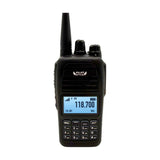
Trig TX56 is a 33 mm high panel-mount VHF NAV/COM for 14 V or 28 V aircraft with a 10 W COM (8.33/25 kHz) and VOR, localizer and glideslope receivers. According to Trig, an existing Nav/Com can be replaced under CS-STAN in Europe.
Trig TX56 is a panel-mount VHF NAV/COM that combines a 10 W COM transceiver for 8.33 and 25 kHz channel spacing with VOR, localizer and glideslope receivers. The unit is 33 mm high, runs on 14 V or 28 V aircraft power and needs no forced-air cooling. It is ETSO-certified, has a graphical CDI, dual watch and a front USB port for a frequency database.
Certified to ETSO-2C169a, 2C128, 2C34f, 2C36f and 2C40c; the COM meets ED-23C classes C, H1 and H2.
COM covers 118.000–136.992 MHz with 2,280 channels at 8.33 kHz and 760 at 25 kHz; NAV covers 108.00–117.95 MHz.
Supply 11–33 V DC; typically 6.1 W at 14 V, with 3.3 A in transmit and 300 mA in receive.
Panel face 33 × 159 mm; 231 mm behind the panel and 274 mm overall in the tray.
A graphical CDI is built in; CDI, glideslope, flag and OBS outputs serve external indicators such as the Trig TI106.
A two-place intercom, a speaker output and stereo music and auxiliary audio inputs are built in.
Front panel and tuning
The display shows the COM frequencies on the left and the NAV frequencies on the right; the COM, NAV, flip-flop, T/F, MEM, MON, PLAY and OBS keys and the Push Step knob serve both radios. Push Step changes the tuning step between 8.33 and 25 kHz without changing the channel in use. Where 8.33 kHz is not needed, it can be set to 25 and 50 kHz.
The PLAY key replays the last transmission received from ATC from a digital recorder.
NAV receiver and CDI
The NAV side combines a VOR receiver, a localizer receiver and a 40-channel glideslope receiver on one NAV antenna input. The unit decodes the Morse identifier of the tuned VOR or ILS station, and the T/F key switches between the inbound and outbound radial.
The graphical CDI on the display works without an external indicator. For external indicators, the unit provides left/right, glideslope, flag, superflag and composite outputs, an OBS interface and a King serial DME tuning interface.
Dual watch and memory
Pressing MON starts dual watch: the COM scans between the active and standby frequencies with priority on the primary channel, which allows ATIS to be copied while the ATC frequency is monitored. In NAV mode, MON displays the radial of the standby VOR, which helps to find the crossing of two radials with one unit.
The MEM key opens the pilot database of frequencies and station identifiers, a list of the ten most recently used frequencies and, with a compatible GPS receiver, a GPS database.
Audio and data interfaces
The unit has a 25-way D connector for COM and audio and a 44-way D connector for NAV. The internal intercom is voice-activated and routes both headsets; the speaker output is driven by a built-in amplifier. It is meant for aircraft with simple audio routing and no conventional audio panel. The stereo music inputs carry music only and must not be used to route audio from other equipment.
An RS-232 input accepts the Apollo SL30 protocol and the Garmin GNC protocol at 9600 bps, so a compatible navigator can preload the active and standby frequencies. A remote flip-flop input is also provided.
Installation and approval
Trig states that in Europe an existing Nav/Com can be replaced under CS-STAN, while an aircraft without Nav/Com functionality needs a Minor Change application. A certified installation is an approved modification followed by a Certificate of Release to Service.
For IFR, Trig recommends at least two VHF COM radios and two NAV receivers: a single TX56 as the only COM and NAV does not meet the failure-probability requirement of CS 23.1309 for IFR flight.
Advanced Exchange ships a serviceable unit before the core is returned. Future Exchange begins after receipt and evaluation of the core and does not require a deposit. Repair retains the original serial number and starts with inspection and quotation.
Advanced Exchange
What happens
You receive a serviceable unit first. Your core goes back afterward.
Pay now
Full SV price plus core deposit.
Core
Return within 15 calendar days. Repairable (not BER) — deposit refunded. Missing or BER — deposit stays.
Time
Typically 2–3 weeks. Warranty 3 months. Released on EASA Form 1 or FAA 8130-3.
Future Exchange
What happens
You send the core first. After we confirm it is repairable, we ship the serviceable replacement.
Pay now
Net exchange price only. No deposit.
Core
Must be repairable (not BER). Same or superseded P/N, data plate on.
Time
Typically 3–4 weeks. Warranty 3 months. Released on EASA Form 1 or FAA 8130-3.
Repair
Serial
Yours stays. No swap unit — that is Exchange.
Shop
We inspect, quote, then repair. Accept the repair quote and the evaluation fee already paid is deducted. Decline or BER — unit returns as-is; evaluation fee stays.
Time
Typically 2–6 weeks after you approve the quote, parts depending. Warranty 3 months. Released on EASA Form 1 or FAA 8130-3.
Return the core in equivalent packaging, with removal data and a non-incident statement where you have them. Late, incomplete, or rejected-core terms are on the quote.
Manufacturer documents, provided for reference. Before installation or operation, make sure you have the current revision.
Can the TX56 replace an SL30 or a KX 155 without rewiring?
No. Trig states that the TX56 is not plug and play. It has the same height as the SL30 and offers every SL30 signal in a one-to-one pin mapping, but the connectors must be repinned. Replacing a KX 155 or KX 165 requires fitting the TX56 tray, and the stereo intercom features need some rewiring.
How do the TX56, TX56A and TX57 differ?
The TX56 offers 8.33 and 25 kHz spacing at 10 W and 11–33 V. The TX56A is a 25 kHz-only version for use outside Europe. The TX57 has 16 W, needs 22–33 V and cannot run from a battery alone; the TX57A combines both differences. All four have the same size and weight.
What does Trig list as supplied, and what else is needed?
Trig lists the unit, the mounting tray and the installation kit. The kit holds the 25-way and 44-way D connector parts, blind-mate BNC adapters, a label sheet and a USB flash drive with the manuals and a sample database. COM and NAV antennas, cables and at least six flat-head screws with self-locking nuts for the tray are not included. Fit depends on the aircraft type and the installed radio.
Which antennas does the TX56 need?
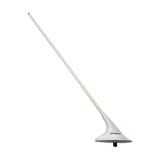
Two inputs are used: one for the COM and one for the NAV. The COM works with a standard 50 ohm vertically polarised antenna with a VSWR better than 2.5:1. The NAV works with a 50 ohm horizontally polarised broadband antenna that also serves the glideslope; separate localizer and glideslope antennas need a combiner or diplexer in front of the single NAV input.
How is the frequency database loaded from USB?
The database is a CSV file on a USB stick that holds up to 250 entries. The stick goes into the front port while the unit is off. At switch-on the unit offers to save or load; existing entries can be replaced or extended. Normal operation resumes after removing the stick and switching off and on. In normal operation the USB port is unpowered.
Is the NAV dual watch suitable for flying an approach?
No. The secondary VOR is sampled periodically, so its radial lags and can be ambiguous; it suits en-route situational awareness. An approach uses the primary channel for final approach course guidance. During dual operation the Morse identifier cannot be heard and the unit does not identify the beacon, and dual operation is not possible with a CDI that has a built-in converter, such as an Aspen PFD.
How does the TX56 behave at low supply voltage?
Below 11 V the radio keeps working, but transmitter power falls: about 2.5 W at 9 V, and the transmitter is inhibited below 8 V. The receiver works normally, and at 10 V or below the speaker volume is reduced to save power. A Low Volt warning appears when the bus voltage drops below 10 V.